
Sub String
A very common text manipulation algorithm is the Sub String option. You can use this option to select a specific string of data from an existing string, and set it to a target column. You need to select the column that is the data source, where you want the result to be stored (destination column) and the index and length of the string to copy, that is – from what digit to start copying and what length of data to copy.
For example, if the source data is a string consisting of a number + name (e.g. 12Nir, 05Joe), and the string that you actually need is the two-digit number at the start of this source data, then you start your index at "0" (the first data digit) and as the number is only 2 digits long – the length would be defined as "2".
The result will be as follows:
| Source Column | Target Column |
|---|---|
| 12Nir | 12 |
| 05Joe | 5 |
The destination column contains only the two-digit number that appears prior to the listed name in the source data column.
To configure this manipulate step, follow the instructions below:
- In the Admin Navigation tree, select Interfaces > InterfaceName > Tasks > TaskName > Steps.
- On the toolbar, click New >New Manipulate Step.
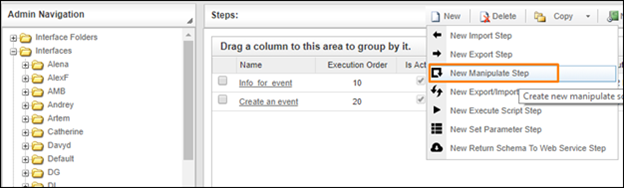
Creating a New Manipulate Step
- Navigate to the Texts section and select Sub String.
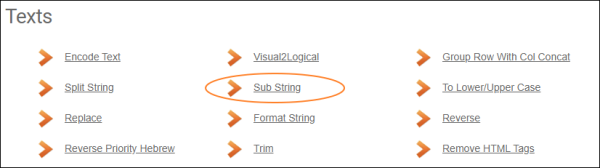
Texts Section
- In the Sub String work area, fill in the following fields:
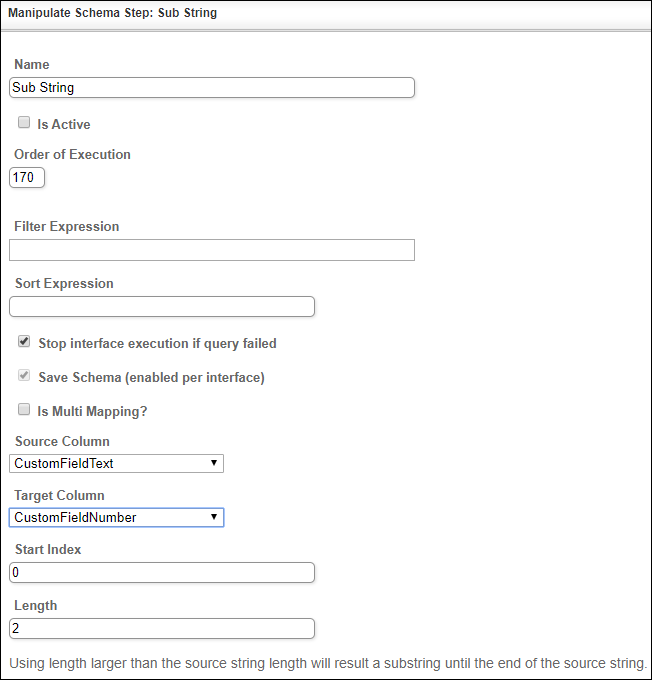
| Fields | Description |
|---|---|
|
Name |
Provide a distinctive name for this step. |
|
Is Active |
Select the check box to engage the scheduler for this step. |
|
Order of Execution |
Enter the order in which this step should be executed. |
|
Filter Expression |
Optional. Use this filed to filter data from the source database prior to inserting it into the Schema table. |
|
Sort Expression |
Optional. Use this field to sort data from the source database prior to inserting it into the Schema table. |
|
Stop interface execution if query failed |
Optional. If enabled, the system will stop any data manipulation if the query returns an error. |
|
Save Schema (enabled per interface) |
If selected, the schema is created for this step. |
| Source Column | Select the column where you will retrieve the data source. |
| Target Column | Select the column where the result will be stored. |
| Start Index | Define the start position of the string from which the substring will be extracted. The value should be integer. |
| Length | Define the length (the number of characters) of the string to extract. The value should be integer. |
- Click the Save button.